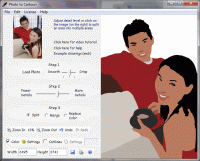
Converts photographs into cartoons and drawings. Use it as an avatar, to sign emails and letters, make greeting cards and party announcements, or illustrate a book or a paper.
Photo to Cartoon converts photographs into cartoons and drawings. Use this program to illustrate your book, your website, to make custom coloring pages for your kids. Replace that cookie cut forum avatar by an actual cartoon of yourself. You'll let people know what you look like without giving them your photo! Make cartoons of your friends, your dog, your house, your neighborhood; don't forget celebrities and politicians. Cartoons make fantastic gifts for friends and colleagues. They look great on t-shorts and mugs too. This program is fun and addictive. It is also intuitive and very easy to use. You don't need any artistic skills, as no drawing required. Photo to Cartoon uses a novel approach to image editing with a "Click Me" attitude. The program splits a photograph into solid color areas, like a mosaic. By clicking on the image, you can split or merge pieces of this mosaic, adding more details to the key areas and simplifying the background. Here is how it works. Just load a high quality high-resolution photo, set the overall level of details in the image with a slider and you are half-way done! Click on the key areas of the image, such as a person, or person's eyes to increase the level of details. Click on the background pieces to merge them together. Replace colors by those you choose if needed. Depending on the level of details you use, and the amount of editing (splitting and merging pieces) you do, the result images can be as real life looking as you like or as cartoon like looking as you like. Photo to Cartoon simplifies the task of creating illustrations for virtually every purpose.
Whats new in version 5.0: Major Release Requirements: 1GHz or faster processor and at least 1GB RAM (2GB recommended) Operating system: WinXP,WinVista,WinVista x64,Win7 x32,Win7 x64 Limitations: 10 uses Release notes: Major Update
MagicBD is a graphic software which can be used to draw many kinds of iconographies, illustrations and sketch maps.It can also be used to edit images to process them or get some special effects.
Price: $28, Rating: 10, Downloads: 234 Download
Pos Free Photo Editor is a free photo editor from the authors of the best free professional photo editor - Photo Pos Pro free photo editor. The software is simple and very user friendly photo editor, that lets you easily view, and enhance your photos
Price: $0.00, Rating: 10, Downloads: 190 Download
Design over 10 photos by few mouse clicks. Easily create photo book, collage, calendar, greeting cards, wedding photos and more artworks.
Price: $39.95, Rating: 0, Downloads: 171 Download
Image Frame is a Photoshop-compatible plug-in for easy creation naturally-look 3D frame. Add frame and text to your photos. You can apply rectangular and elliptical frame, change frame profile, material, and lightening.
Price: $14.95, Rating: 10, Downloads: 160 Download
User Rating
Rating:2.2 out of
5 Based on13 ratings.
13 user reviews.

 Photo to Cartoon 5.0 details